
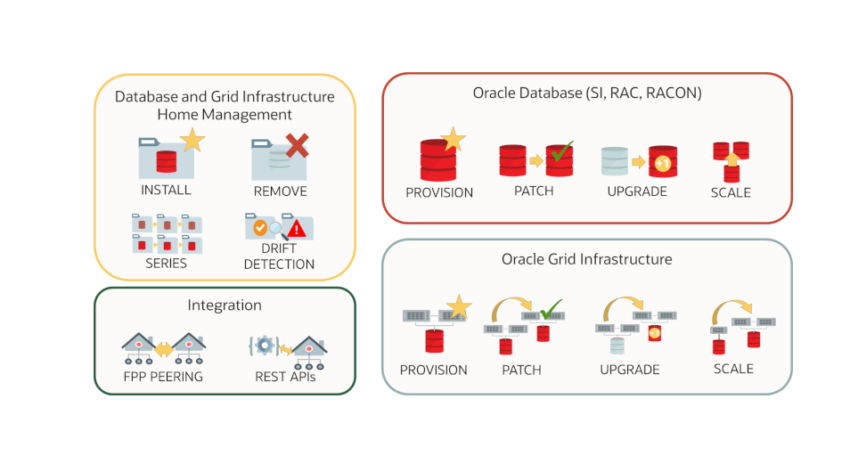
Only thingt hat was needed from me was to download it from gitlab and start the provisioning with the simple “vagrant up”.
After some time (depends on the speed of the server) both vm’s were up. The server with the 21.3 Grid and 21.3 Oracle home.
I’ve installed basic 19.3 on the server and after that and imported the home:
[grid@fpps ~]$ rhpctl import image -image db_193 -imagetype ORACLEDBSOFTWARE -path /u01/app/oracle/product/19.3/dbhome_1
fpps.localdomain: Audit ID: 2
fpps.localdomain: Creating a new ACFS file system for image "db_193" ...
fpps.localdomain: Copying files...
fpps.localdomain: Copying home contents...
fpps.localdomain: Changing the home ownership to user oracle...
fpps.localdomain: Changing the home ownership to user grid and group oinstall...
Now, lets see the image:
[grid@fpps ~]$ rhpctl query image -image db_193
fpps.localdomain: Audit ID: 10
Image name: db_193
Owner: grid@vgt-ol7-fpp-c
Site: vgt-ol7-fpp-c
Access control: USER:grid@vgt-ol7-fpp-c
Access control: ROLE:OTHER
Access control: ROLE:GH_IMG_PUBLISH
Access control: ROLE:GH_IMG_ADMIN
Access control: ROLE:GH_IMG_VISIBILITY
Parent Image:
Software home path: /rhp_storage/images/idb_193729753/.ACFS/snaps/idb_193/swhome
Image state: PUBLISHED
Image size: 7136 Megabytes
Image Type: ORACLEDBSOFTWARE
Image Version: 19.0.0.0.0:19.3.0.0.0
Groups configured in the image: OSDBA=dba,OSOPER=oper,OSBACKUP=dba,OSDG=dba,OSKM=dba,OSRAC=dba
Image platform: Linux_AMD64
Interim patches installed: 29585399,29517242
Contains a non-rolling patch: FALSE
Complete: TRUE
Now, we can install 19.3 on the client:
[grid@fpps ~]$ rhpctl add workingcopy -workingcopy wc_db_193 -image db_193 -user oracle -groups OSBACKUP=dba,OSDG=dba,OSKM=dba,OSRAC=dba -oraclebase /u01/app/oracle -inventory /u01/app/oraInventory -ignoreprereq -path /u01/app/oracle/product/19.3/dbhome_1 -targetnode fppc -root

fpps.localdomain: Audit ID: 3
Enter user "root" password:
fpps.localdomain: Option storagetype is set to the following default value: LOCAL.
fpps.localdomain: Storing metadata in repository for working copy "wc_db_193" ...
fpps.localdomain: Connecting to node fppc ...
fpps.localdomain: Starting transfer for remote copy ...
fpps.localdomain: Starting clone operation...
fppc: Launching Oracle Database Setup Wizard...
fppc:
fppc: [WARNING] [INS-32047] The location (/u01/app/oraInventory) specified for the central inventory is not empty.
fppc:    ACTION: It is recommended to provide an empty location for the inventory.
fppc: [WARNING] [INS-13014] Target environment does not meet some optional requirements.
fppc:    CAUSE: Some of the optional prerequisites are not met. See logs for details. installActions2023-11-21_01-50-20PM.log
fppc:    ACTION: Identify the list of failed prerequisite checks from the log: installActions2023-11-21_01-50-20PM.log. Then either from the log file or from installation manual find the appropriate configuration to meet the prerequisites and fix it manually.
fppc: The response file for this session can be found at:
fppc:  /u01/app/oracle/product/19.3/dbhome_1/install/response/db_2023-11-21_01-50-20PM.rsp
fppc:
fppc: You can find the log of this install session at:
fppc:  /tmp/InstallActions2023-11-21_01-50-20PM/installActions2023-11-21_01-50-20PM.log
fppc:
fppc: As a root user, execute the following script(s):
fppc:   1. /u01/app/oraInventory/orainstRoot.sh
fppc:   2. /u01/app/oracle/product/19.3/dbhome_1/root.sh
fppc:
fppc: Execute /u01/app/oraInventory/orainstRoot.sh on the following nodes:
fppc: [fppc]
fppc: Execute /u01/app/oracle/product/19.3/dbhome_1/root.sh on the following nodes:
fppc: [fppc]
fppc:
fppc:
fppc: Successfully Setup Software with warning(s).
fppc: Moved the install session logs to:
fppc:  /u01/app/oraInventory/logs/InstallActions2023-11-21_01-50-20PM
fpps.localdomain: Successfully executed clone operation.
fpps.localdomain: Executing root script on nodes fppc.
fppc: Changing permissions of /u01/app/oraInventory.
fppc: Adding read,write permissions for group.
fppc: Removing read,write,execute permissions for world.
fppc:
fppc: Changing groupname of /u01/app/oraInventory to oinstall.
fppc: The execution of the script is complete.
fppc: Check /u01/app/oracle/product/19.3/dbhome_1/install/root_fppc_2023-11-21_13-52-24-796575575.log for the output of root script
fpps.localdomain: Successfully executed root script on nodes fppc.
fpps.localdomain: Working copy creation completed.
Now, we can create database in the provisioned home:
[grid@fpps ~]$ rhpctl add database -workingcopy wc_db_193 -dbname CDB19 -dbtype SINGLE -cdb -pdbName PDB1 -root
fpps.localdomain: Audit ID: 4
Enter user "root" password:
fpps.localdomain: Option datafileDestination is set to the following default value: /u01/app/oracle/oradata.
fpps.localdomain: Starting database creation on node fppc ...
fppc: SYS_PASSWORD_PROMPT
fppc: ***********
fppc: SYSTEM_PASSWORD_PROMPT
fppc: *******
fppc: PDB_ADMIN_PASSWORD_PROMPT
fppc: *********
fppc: [WARNING] [DBT-06208] The 'SYS' password entered does not conform to the Oracle recommended standards.
fppc:    CAUSE:
fppc: a. Oracle recommends that the password entered should be at least 8 characters in length, contain at least 1 uppercase character, 1 lower case character and 1 digit [0-9].
fppc: b.The password entered is a keyword that Oracle does not recommend to be used as password
fppc:    ACTION: Specify a strong password. If required refer Oracle documentation for guidelines.
fppc: [WARNING] [DBT-06208] The 'SYSTEM' password entered does not conform to the Oracle recommended standards.
fppc:    CAUSE:
fppc: a. Oracle recommends that the password entered should be at least 8 characters in length, contain at least 1 uppercase character, 1 lower case character and 1 digit [0-9].
fppc: b.The password entered is a keyword that Oracle does not recommend to be used as password
fppc:    ACTION: Specify a strong password. If required refer Oracle documentation for guidelines.
fppc: [WARNING] [DBT-06208] The 'PDBADMIN' password entered does not conform to the Oracle recommended standards.
fppc:    CAUSE:
fppc: a. Oracle recommends that the password entered should be at least 8 characters in length, contain at least 1 uppercase character, 1 lower case character and 1 digit [0-9].
fppc: b.The password entered is a keyword that Oracle does not recommend to be used as password
fppc:    ACTION: Specify a strong password. If required refer Oracle documentation for guidelines.
fppc: Prepare for db operation
fppc: 8% complete
fppc: Copying database files
fppc: 31% complete
fppc: Creating and starting Oracle instance
fppc: 32% complete
fppc: 36% complete
fppc: 40% complete
fppc: 43% complete
After some time, database is up and running. Now, we will patch the 19.3 to 19.18. I’ve installed and patched software on the server. Now, we can add image of that oracle home:
[grid@fpps ~]$ rhpctl import image -image db_1918 -imagetype ORACLEDBSOFTWARE -path /u01/app/oracle/product/19.18/dbhome_1
fpps.localdomain: Audit ID: 5
fpps.localdomain: Creating a new ACFS file system for image "db_1918" ...
fpps.localdomain: Copying files...
fpps.localdomain: Copying home contents...
fpps.localdomain: Changing the home ownership to user oracle...
fpps.localdomain: Changing the home ownership to user grid and group oinstall...
After that, we can provision the new home to the client:
[grid@fpps ~]$ rhpctl add workingcopy -workingcopy wc_db_1918 -image db_1918 -user oracle -groups OSBACKUP=dba,OSDG=dba,OSKM=dba,OSRAC=dba -oraclebase /u01/app/oracle -inventory /u01/app/oraInventory -ignoreprereq -path /u01/app/oracle/product/19.18/dbhome_1 -targetnode fppc -root
fpps.localdomain: Audit ID: 6
Enter user "root" password:
fpps.localdomain: Option storagetype is set to the following default value: LOCAL.
fpps.localdomain: Storing metadata in repository for working copy "wc_db_1918" ...
fpps.localdomain: Connecting to node fppc ...
fpps.localdomain: Starting transfer for remote copy ...
fpps.localdomain: Starting clone operation...
fpps.localdomain: Using inventory file /etc/oraInst.loc to clone ...
fppc: Launching Oracle Database Setup Wizard...
fppc:
fppc: [WARNING] [INS-13014] Target environment does not meet some optional requirements.
fppc:    CAUSE: Some of the optional prerequisites are not met. See logs for details. /u01/app/oraInventory/logs/InstallActions2023-11-22_08-42-43AM/installActions2023-11-22_08-42-43AM.log
fppc:    ACTION: Identify the list of failed prerequisite checks from the log: /u01/app/oraInventory/logs/InstallActions2023-11-22_08-42-43AM/installActions2023-11-22_08-42-43AM.log. Then either from the log file or from installation manual find the appropria
te configuration to meet the prerequisites and fix it manually.
fppc: The response file for this session can be found at:
fppc:  /u01/app/oracle/product/19.18/dbhome_1/install/response/db_2023-11-22_08-42-43AM.rsp
fppc:
fppc: You can find the log of this install session at:
fppc:  /u01/app/oraInventory/logs/InstallActions2023-11-22_08-42-43AM/installActions2023-11-22_08-42-43AM.log
fppc:
fppc: As a root user, execute the following script(s):
fppc:   1. /u01/app/oracle/product/19.18/dbhome_1/root.sh
fppc:
fppc: Execute /u01/app/oracle/product/19.18/dbhome_1/root.sh on the following nodes:
fppc: [fppc]
fppc:
fppc:
fppc: Successfully Setup Software with warning(s).
fpps.localdomain: Successfully executed clone operation.
fpps.localdomain: Executing root script on nodes fppc.
fppc: Check /u01/app/oracle/product/19.18/dbhome_1/install/root_fppc_2023-11-22_08-46-13-576209450.log for the output of root script
fpps.localdomain: Successfully executed root script on nodes fppc.
fpps.localdomain: Working copy creation completed.
Next step, is to move db from 19.3 to 19.18 and run datapatch:
[grid@fpps ~]$ rhpctl move database -dbname CDB19 -sourcewc wc_db_193 -patchedwc wc_db_1918 -root
fpps.localdomain: Audit ID: 9
Enter user "root" password:
fpps.localdomain: verifying versions of Oracle homes ...
fpps.localdomain: verifying owners of Oracle homes ...
fpps.localdomain: verifying groups of Oracle homes ...
fpps.localdomain: starting to move the following databases: "CDB19"
fpps.localdomain: restarting databases: "CDB19" ...
fppc:
fppc: SQL*Plus: Release 19.0.0.0.0 - Production on Wed Nov 22 08:58:47 2023
fppc: Version 19.3.0.0.0
fppc:
fppc: Copyright (c) 1982, 2019, Oracle.  All rights reserved.
fppc:
fppc:
fppc: Connected to:
fppc: Oracle Database 19c Enterprise Edition Release 19.0.0.0.0 - Production
fppc: Version 19.3.0.0.0
fppc:
fppc: SQL>
fppc: Pluggable database altered.
fppc:
fppc: SQL> Disconnected from Oracle Database 19c Enterprise Edition Release 19.0.0.0.0 - Production
fppc: Version 19.3.0.0.0
fpps.localdomain: stopping instances of databases "CDB19" ...
fppc:
fppc: SQL*Plus: Release 19.0.0.0.0 - Production on Wed Nov 22 08:58:50 2023
fppc: Version 19.3.0.0.0
fppc:
fppc: Copyright (c) 1982, 2019, Oracle.  All rights reserved.
fppc:
fppc:
fppc: Connected to:
fppc: Oracle Database 19c Enterprise Edition Release 19.0.0.0.0 - Production
fppc: Version 19.3.0.0.0
fppc:
fppc: SQL> Database closed.
fppc: Database dismounted.
fppc: ORACLE instance shut down.
fppc: SQL> Disconnected from Oracle Database 19c Enterprise Edition Release 19.0.0.0.0 - Production
fppc: Version 19.3.0.0.0
fppc: 2023-11-22T07:59:38Z : standalone non-GI and non-SIHA node
fppc: /u01/app/oracle/product/19.18/dbhome_1
fppc:
fppc: CDB19
fppc:
fppc: trying datapatch run for CDB19, attempt### 1 ###
fppc: datapatch completed successfully for database : CDB19
fpps.localdomain: Completed the 'move database' operation for databases: "CDB19"
Check the DB:
[oracle@fppc trace]$ . oraenv
ORACLE_SID = [CDB19] ? CDB19
The Oracle base remains unchanged with value /u01/app/oracle
[oracle@fppc trace]$ sqlplus

SQL*Plus: Release 19.0.0.0.0 - Production on Wed Nov 22 12:46:06 2023
Version 19.18.0.0.0

Copyright (c) 1982, 2022, Oracle.  All rights reserved.

Enter user-name: / as sysdba

Connected to:
Oracle Database 19c Enterprise Edition Release 19.0.0.0.0 - Production
Version 19.18.0.0.0

SQL> show pdbs

    CON_ID CON_NAME                       OPEN MODE  RESTRICTED
---------- ------------------------------ ---------- ----------
         2 PDB$SEED                       READ ONLY  NO
         3 PDB1                           READ WRITE NO


    CON_ID ACTION_TIME            PATCH_ID PATCH_TYPE ACTION     DESCRIPTION                                                  SOURCE_VERSION  TARGET_VERSION
---------- -------------------- ---------- ---------- ---------- ------------------------------------------------------------ --------------- ---------------
         1 2023-11-21             29517242 RU         APPLY      Database Release Update : 19.3.0.0.190416 (29517242)         19.1.0.0.0      19.3.0.0.0
         1 2023-11-22             34765931 RU         APPLY      DATABASE RELEASE UPDATE : 19.18.0.0.0 (REL-JAN230131) (34765 19.3.0.0.0      19.18.0.0.0
Now, we can cleanup the old 19.3 home from the clilent and server.
Client:
[grid@fpps ~]$ rhpctl delete workingcopy -workingcopy wc_db_193 -root
fpps.localdomain: Audit ID: 14
Enter user "root" password:
fpps.localdomain: Removing working copy home ...
fppc: Checking for required files and bootstrapping ...
fppc: Please wait ...
fppc: Location of logs /u01/app/oraInventory/logs/
fppc:
fppc: ############ ORACLE DECONFIG TOOL START ############
fppc:
fppc:
fppc: ######################### DECONFIG CHECK OPERATION START #########################
fppc: ## [START] Install check configuration ##
fppc:
fppc:
fppc: Checking for existence of the Oracle home location /u01/app/oracle/product/19.3/dbhome_1
fppc: Oracle Home type selected for deinstall is: Oracle Single Instance Database
fppc: Oracle Base selected for deinstall is: /u01/app/oracle
fppc: Checking for existence of central inventory location /u01/app/oraInventory
fppc:
fppc: ## [END] Install check configuration ##
xxx
xxx
xxx
xxx
fppc:
fppc: ####################### DEINSTALL CLEAN OPERATION SUMMARY #######################
fppc: Successfully detached Oracle home '/u01/app/oracle/product/19.3/dbhome_1' from the central inventory on the local node.
fppc: Successfully deleted directory '/u01/app/oracle/product/19.3/dbhome_1' on the local node.
fppc: Oracle Universal Installer cleanup was successful.
fppc:
fppc: Review the permissions and contents of '/u01/app/oracle' on nodes(s) 'fppc'.
fppc: If there are no Oracle home(s) associated with '/u01/app/oracle', manually delete '/u01/app/oracle' and its contents.
fppc: Oracle deinstall tool successfully cleaned up temporary directories.
fppc: #######################################################################
fppc:
fppc:
fppc: ############# ORACLE DEINSTALL TOOL END #############
fppc:
Server:
[grid@fpps ~]$ rhpctl delete image -image db_193
fpps.localdomain: Audit ID: 15
fpps.localdomain: Finding ACFS file system of the image "db_193" with home path "/rhp_storage/images/idb_193729753/.ACFS/snaps/idb_193/swhome" ...
fpps.localdomain: Deleting image from the repository ...
Last login: Wed Nov 22 13:20:38 +01 2023
[oracle@fpps ~]$ cd /u01/app/oracle/product/19.3/dbhome_1/deinstall/
[oracle@fpps deinstall]$ ./deinstall
Checking for required files and bootstrapping ...
Please wait ...
Location of logs /u01/app/oraInventory/logs/

############ ORACLE DECONFIG TOOL START ############


######################### DECONFIG CHECK OPERATION START #########################
## [START] Install check configuration ##


Checking for existence of the Oracle home location /u01/app/oracle/product/19.3/dbhome_1
Oracle Home type selected for deinstall is: Oracle Single Instance Database
Oracle Base selected for deinstall is: /u01/app/oracle
Checking for existence of central inventory location /u01/app/oraInventory

## [END] Install check configuration ##


Network Configuration check config START

Network de-configuration trace file location: /u01/app/oraInventory/logs/netdc_check2023-11-22_01-37-57PM.log

Network Configuration check config END

Database Check Configuration START

Database de-configuration trace file location: /u01/app/oraInventory/logs/databasedc_check2023-11-22_01-37-57PM.log

Use comma as separator when specifying list of values as input

Specify the list of database names that are configured in this Oracle home []:
Database Check Configuration END

######################### DECONFIG CHECK OPERATION END #########################
xxxx
xxxx
xxxx
######################### DEINSTALL CLEAN OPERATION END #########################


####################### DEINSTALL CLEAN OPERATION SUMMARY #######################
Successfully detached Oracle home '/u01/app/oracle/product/19.3/dbhome_1' from the central inventory on the local node.
Successfully deleted directory '/u01/app/oracle/product/19.3/dbhome_1' on the local node.
Oracle Universal Installer cleanup was successful.

Review the permissions and contents of '/u01/app/oracle' on nodes(s) 'fpps'.
If there are no Oracle home(s) associated with '/u01/app/oracle', manually delete '/u01/app/oracle' and its contents.
Oracle deinstall tool successfully cleaned up temporary directories.
#######################################################################


############# ORACLE DEINSTALL TOOL END #############
Lets create a new PDB in the database:
[grid@fpps ~]$ rhpctl addpdb database -workingcopy wc_db_1918 -cdbname CDB19 -pdbname PDB2 -root
fpps.localdomain: Audit ID: 16
Enter user "root" password:
fpps.localdomain: Option dbtype is set to the following default value: SINGLE.
fpps.localdomain: Option datafileDestination is set to the following default value: /u01/app/oracle/oradata.
fpps.localdomain: Starting pluggable database addition on node fppc ...
fppc: Enter PDBADMIN User Password:
fppc: ********
fppc: Prepare for db operation
fppc: 13% complete
fppc: Creating Pluggable Database
fppc: 15% complete
fppc: 19% complete
fppc: 23% complete
fppc: 31% complete
fppc: 53% complete
fppc: Completing Pluggable Database Creation
fppc: 60% complete
fppc: Executing Post Configuration Actions
fppc: 100% complete
fppc: Pluggable database "PDB2" plugged successfully.
fppc: Look at the log file "/u01/app/oracle/cfgtoollogs/dbca/CDB19/PDB2/CDB19.log" for further details.
Check the new DB:
[oracle@fppc trace]$ sqlplus

SQL*Plus: Release 19.0.0.0.0 - Production on Wed Nov 22 13:54:25 2023
Version 19.18.0.0.0

Copyright (c) 1982, 2022, Oracle.  All rights reserved.

Enter user-name: / as sysdba

Connected to:
Oracle Database 19c Enterprise Edition Release 19.0.0.0.0 - Production
Version 19.18.0.0.0

SQL> show pdbs

    CON_ID CON_NAME                       OPEN MODE  RESTRICTED
---------- ------------------------------ ---------- ----------
         2 PDB$SEED                       READ ONLY  NO
         3 PDB1                           READ WRITE NO
         4 PDB2                           READ WRITE NO